Quickstart
FHIR to OMOP (F2O) ETL converts FHIR clinical data into the OMOP Common Data Model. The terminology step — matching a source code like ICD-10-CM E11.9 to the right OMOP concept IDs and CDM columns — is where Echidna comes in. The core recipe is two calls: $translate to convert the source code into an OMOP concept, then $lookup to resolve the standard concept and domain.
Running Workflow 3? Point your engine's terminology calls at the base URL below — the recipe on this page is all you need.
Base URL
https://echidna.fhir.org
Echidna supports both FHIR R4 (/r4) and R5 (/r5). The examples below use /r4.
The OMOP CodeSystem URI is https://fhir-terminology.ohdsi.org — use this as the system parameter when referring to OMOP concepts, or as targetsystem when translating into OMOP. The vocabulary version served is 20260227.
The Recipe
Every FHIR-to-OMOP code translation follows the same two-call pattern:
source code →
$translate→ concept_id →$lookup→ standard-concept flag + Maps to + domain → CDM columns
Here it is end-to-end, using ICD-10-CM E11.9 (Type 2 diabetes mellitus without complications) as the example.
Run this recipe against your own codes on the Try It page.
Step 1 — Translate the source code
$translate maps any supported source code (ICD-10-CM, SNOMED, RxNorm, LOINC, …) to its OMOP equivalent. Pass the source vocabulary URI as system, the code as code, and restrict the result to OMOP using targetsystem.
For E11.9:
curl 'https://echidna.fhir.org/r4/ConceptMap/$translate?system=http://hl7.org/fhir/sid/icd-10-cm&code=E11.9&targetsystem=https://fhir-terminology.ohdsi.org'
The server returns concept_id 35206882 — the OMOP source concept that represents the ICD-10-CM code itself:
{
  "resourceType": "Parameters",
  "parameter": [
    { "name": "result", "valueBoolean": true },
    {
      "name": "match",
      "part": [
        { "name": "equivalence", "valueCode": "equivalent" },
        { "name": "concept", "valueCoding": {
            "code": "35206882",
            "system": "https://fhir-terminology.ohdsi.org",
            "version": "20260227"
          }
        }
      ]
    }
  ]
}
Hold on to 35206882 — you'll pass it into step 2, and it will go into the *_source_concept_id column in the CDM.
This is the intended behaviour — OMOP stores both IDs. Step 2 resolves the standard concept from the source concept via the Maps to relationship. See Source vs. Standard Concepts for the full explanation.
Step 2 — Resolve the standard concept and domain
$lookup retrieves the full detail of any OMOP concept by its concept_id — including the Maps to relationship (the analytics-ready standard concept) and the domain-id (which CDM table to write). Use property (repeatable) to request specific properties.
Pass the source concept_id from step 1. Always request standard-concept alongside Maps to — you need it to determine the correct column assignment:
curl 'https://echidna.fhir.org/r4/CodeSystem/$lookup?system=https://fhir-terminology.ohdsi.org&code=35206882&property=standard-concept&property=Maps+to&property=domain-id'
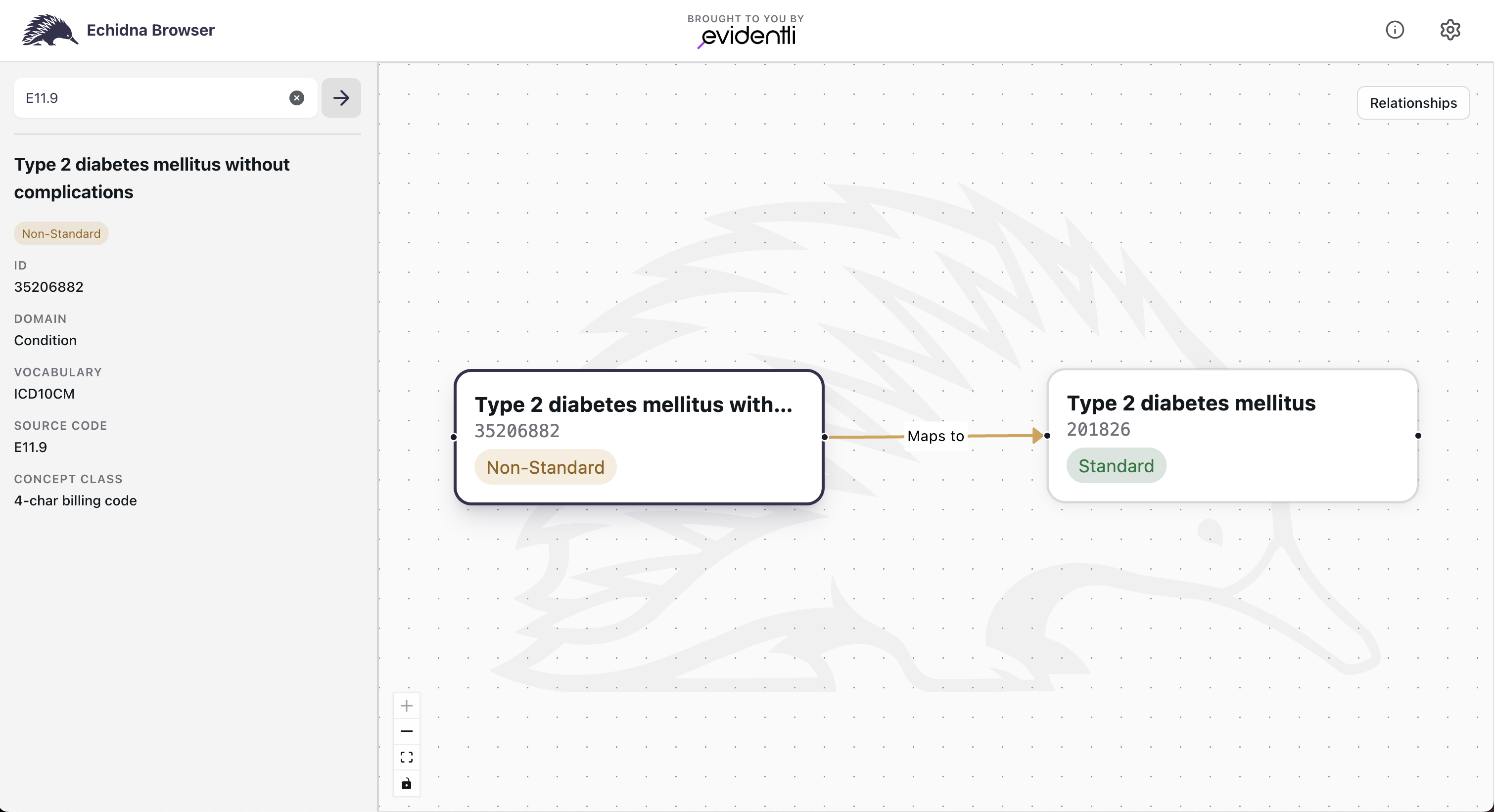
The response shows standard-concept = NS (this is a non-standard source concept), Maps to → 201826 ("Type 2 diabetes mellitus", SNOMED, standard), and domain-id → Condition:
{
  "resourceType": "Parameters",
  "parameter": [
    { "name": "code",    "valueCode":   "35206882" },
    { "name": "display", "valueString": "Type 2 diabetes mellitus without complications" },
    {
      "name": "property",
      "part": [
        { "name": "code",  "valueCode": "standard-concept" },
        { "name": "value", "valueCode": "NS" }
      ]
    },
    {
      "name": "property",
      "part": [
        { "name": "code",  "valueCode": "Maps to" },
        { "name": "value", "valueCoding": { "code": "201826" } }
      ]
    },
    {
      "name": "property",
      "part": [
        { "name": "code",  "valueCode": "domain-id" },
        { "name": "value", "valueCode": "Condition" }
      ]
    }
  ]
}
The Echidna Browser visualises the same relationship — 35206882 (Non-Standard) with a Maps to arrow to 201826 (Standard):
Step 3 — Write the OMOP CDM row
You now have everything needed to write the CDM row. The domain-id selects the table:
domain-id | CDM table |
|---|---|
Condition | condition_occurrence |
Drug | drug_exposure |
Measurement | measurement |
Observation | observation |
Procedure | procedure_occurrence |
Device | device_exposure |
Visit | visit_occurrence |
Here the source concept (35206882) and its Maps to target (201826) share the Condition domain, so the domain-id from Step 2 routes correctly. In general-purpose ETL don't rely on that: a Maps to edge can cross domains, so read domain-id from the standard concept ($lookup the Maps to target) to be sure.
Don't route on the FHIR resource type either. LOINC 8867-4 (Heart rate) arrives as an Observation but resolves to OMOP domain Measurement ($lookup on 3027018) — routing by resource type would write it to the wrong table. See the Try It page for this case, worked live.
For E11.9 the domain is Condition, so write to condition_occurrence:
| concept_id | Source | OMOP CDM Table Column |
|---|---|---|
35206882 | Step 1 — $translate result | condition_occurrence.condition_source_concept_id |
201826 | Step 2 — Maps to property | condition_occurrence.condition_concept_id |
Use standard-concept from $lookup — not the presence or absence of Maps to — to determine column assignment:
standard-concept = S— the concept from Step 1 is already standard. Write it to both*_source_concept_idand*_concept_id.standard-concept = NS,Maps topresent — the normal case shown above. Write theMaps totarget to*_concept_id.standard-concept = NS, noMaps to— no standard mapping exists. Write*_concept_id = 0.standard-concept = C— Classification concepts are hierarchy groupers used for browsing, not patient-level rows. In practice,$translateon clinical source codes will not returnC.
Non-standard concepts with no Maps to target exist, so absence of Maps to alone does not mean the concept is standard.
Going further
Two patterns come up often in real F2O implementations:
- Some codes split into multiple OMOP concepts — a primary concept and a
value_as_concept_id. See Values and Qualifiers. - Going the other direction (OMOP → FHIR source code)? See OMOP to FHIR.